
Trend-following bot upgrade: Custom parameter settings now supported
To better align trading bots with different market conditions and trading preferences, the trend-following bot now supports Manual creation mode. In addition to the existing AI bot, you can now set and adjust commonly used technical indicator parameters and flexibly configure signals and risk control conditions.
What's new in this update
1. New Manual creation mode
On the spot and futures trend-following bot creation pages, you can freely switch between AI bot and Manual creation:
- AI bot: Offers preset strategies such as Conservative, Balanced, and Aggressive, making it ideal for users who want to create a bot quickly.
- Manual creation (custom parameters): Designed for users with technical analysis experience or specific trading preferences, allowing them to adjust key indicator parameters as needed.
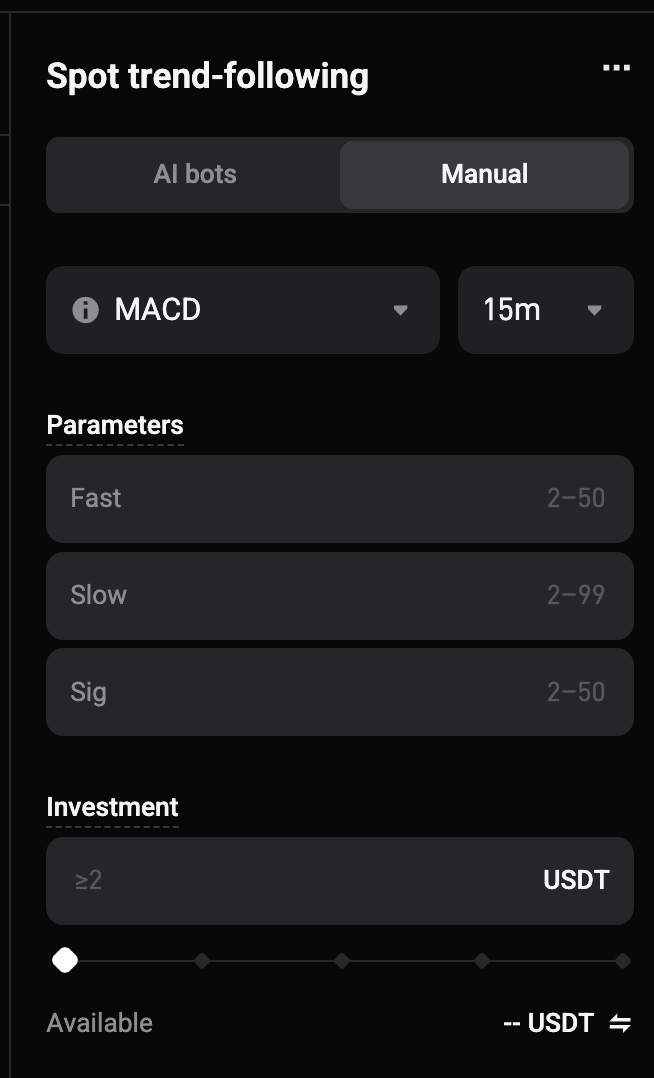
2. Custom configuration for four types of technical indicators
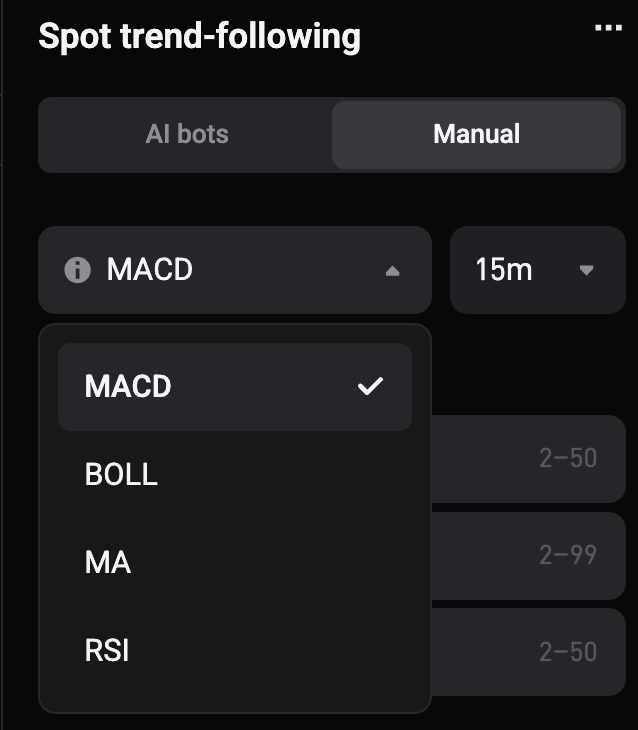
Manual creation mode now supports the following indicators:
- MACD (Moving Average Convergence Divergence): Identifies trends and potential buy and sell signals based on changes in the fast line, slow line, and signal line. Adjustable parameters include Fast (fast-line period), Slow (slow-line period), and Sig (signal period).
- BOLL (Bollinger Band): Uses price ranges to help identify breakouts, pullbacks, and market volatility. Adjustable parameters include K (period) and N (standard deviation multiplier).
- MA (moving average): Determines the trend direction based on the relationship between short-term and long-term moving averages. Adjustable parameters include Fast (fast-line period) and Slow (slow-line period).
- RSI (Relative Strength Index): Uses overbought and oversold ranges to help assess market strength and identify potential reversal opportunities. Adjustable parameters include K (calculation period), Buy Threshold (oversold threshold), and Sell Threshold (overbought threshold).
3. New advanced risk control settings
Under Advanced settings, you can further configure volatility filter parameters.
4. More flexible and intuitive parameter settings
- Custom parameters for different indicators are saved separately, so switching indicators will not erase the information you have entered;
- Switching the candlestick period will not automatically modify your configured indicator parameters;
- Period-based parameters are measured in the number of candlesticks. The actual duration depends on your selected candlestick period.
For example, when Fast is set to 12, it represents approximately 12 hours of data on the 1-hour candlestick period and approximately 48 hours of data on the 4-hour candlestick period.
How to use
1. Web: Select Trade from the top navigation bar, then Trading bots to open the trading bot page.
2. App: Tap Trade at the bottom, then Trading bots at the top to open the trading bot page.
3. Select Spot trend-following or Futures trend-following;
4. Select Manual creation on the creation page;
5. Select a technical indicator and set its parameters;
6. Confirm the investment amount or margin, direction, and leverage for futures, then complete the setup.
Tip: Update the app to the latest version to access the new features.
Join Bitget, the world's largest Universal Exchange (UEX)
Share


