
How to View Popular Elite Traders on the Gold/Indices Candlestick Chart Page on Bitget App?
[Estimated reading time: 3 mins]
This article explains how to find popular elite traders directly from the Gold/Indices candlestick chart page on the Bitget App. You can use this feature to quickly view top-performing elite traders for a specific product while browsing market data.
Who can use this feature
This feature is suitable for users who want to quickly learn about top-performing elite traders for a specific Gold/Indices product, such as XAUUSD, while viewing the product’s candlestick chart.
How to copy popular elite traders
Step 1: Open the Copy Trading tab
1. On the Gold/Indices candlestick chart page, swipe the top tab bar.
2. Find and tap Copy Trading.
Step 2: View popular elite traders
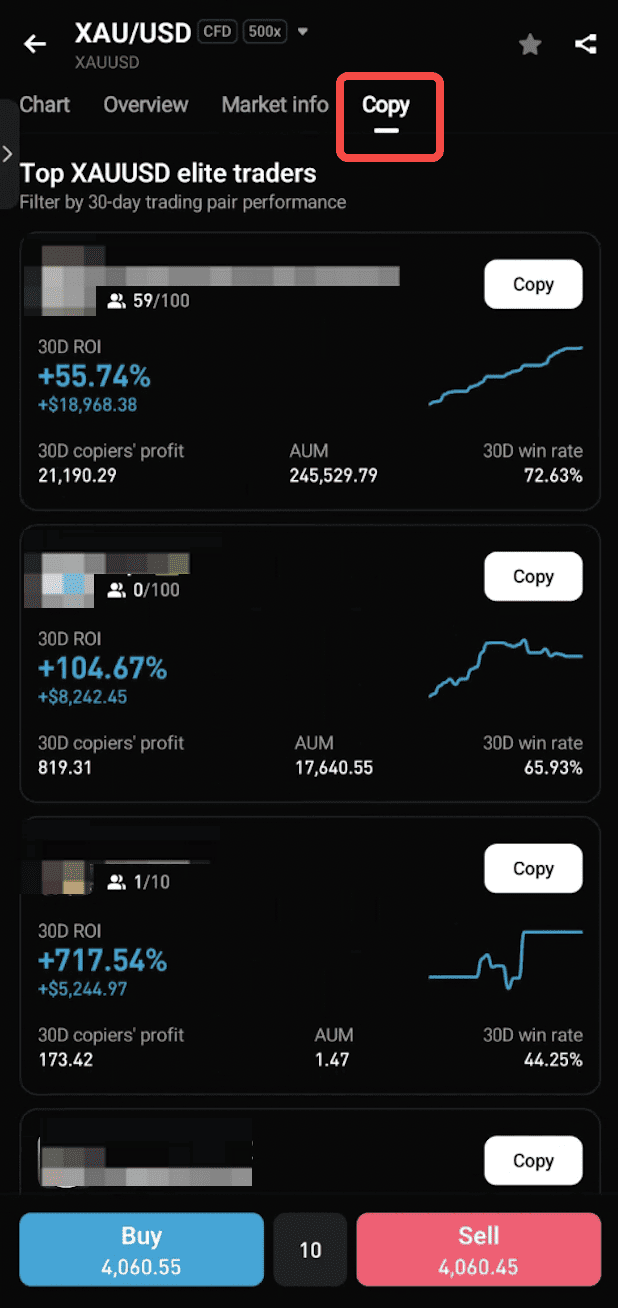
1. The page will display a list of popular elite traders with the best performance over the past 30 days for the current product, such as XAUUSD.
2. Browse the elite trader cards to view details such as nickname, 30-day ROI, and current number of copiers.
Step 3: Review an elite trader’s profile
1. Tap an elite trader card or Copy to enter the elite trader’s profile page.
2. Review their detailed strategy before deciding whether to copy them.
Step 4: View more elite traders
1. Tap View More Elite Traders at the bottom of the page.
2. You will be directed to the Gold/Indices copy trading leaderboard, where you can browse all elite traders.
How popular elite traders are selected
The elite traders displayed in the list must meet all of the following conditions:
• Their realized profit for the current product over the past 30 days is positive.
• Their overall account total profit and ROI over the past 30 days are both positive.
• Their copiers have not incurred losses over the past 30 days.
• Their lead trading project is operating normally. Closed projects are not included in the statistics.
Eligible elite traders are ranked by total account profit over the past 30 days in descending order. Up to 10 elite traders may be displayed.
If there are no eligible elite traders
If there are currently no elite traders who meet the conditions for the current product, the list will display No eligible elite traders available.
You can tap View Leaderboard to go to the Gold/Indices copy trading leaderboard and search for elite traders for other products.
Notes
• The elite trader list is calculated based on a fixed 30-day rolling period.
• The list is updated in real time each time you enter the page.
• Elite trader performance is for reference only and does not guarantee future results. Please review the elite trader’s profile and risk details before copying.
FAQs
1. Are the elite traders in the Copy Trading tab the same as those on the leaderboard?
The filtering logic is consistent with the leaderboard, but the Copy Trading tab on the candlestick chart page has one additional requirement: the elite trader must have positive realized profit for the current product. Therefore, all elite traders in the list have a real profit record for that product.
2. Why do I see different elite traders on different product pages?
The list is filtered in real time based on the product you are currently viewing. Each product displays the elite traders who perform best for that product, so the results may vary across different product pages.
3. What information is shown about elite traders?
Each elite trader card shows key details such as nickname, 30-day ROI, and the current number of copiers, helping users compare performance easily.
4. What does it mean if no elite traders are displayed?
If no traders meet the requirements for the current product, the system will show “No eligible elite traders available.” You can then visit the leaderboard to explore traders from other products.
Join Bitget, the world's largest Universal Exchange (UEX)
Share


