
The current article does not support the language you selected, it has been automatically recommended to English for you
How to Deposit and Withdraw HKD on Bitget Website?
[Estimated Reading Time: 4 minutes]
This article provides a step-by-step guide on how to deposit and withdraw HKD on Bitget using bank transfer. Before using HKD fiat services, you may be required to complete account authorization and bind a receiving bank account.
Unsupported Countries and Regions
Due to compliance restrictions, HKD SWIFT transfers are not supported in the following countries and regions:
Afghanistan, Belarus, Cuba, Central African Republic, Russia, North Korea, Iran, Myanmar, Democratic Republic of the Congo, Libya, Nicaragua, South Sudan, Syria, Ukraine, Venezuela, Palestine (including the Gaza Strip)
Before You Start
Before using SWIFT to transfer HKD, please complete the following steps:
-
Select HKD and choose Bank deposit as your deposit method.
-
Complete identity verification:
-
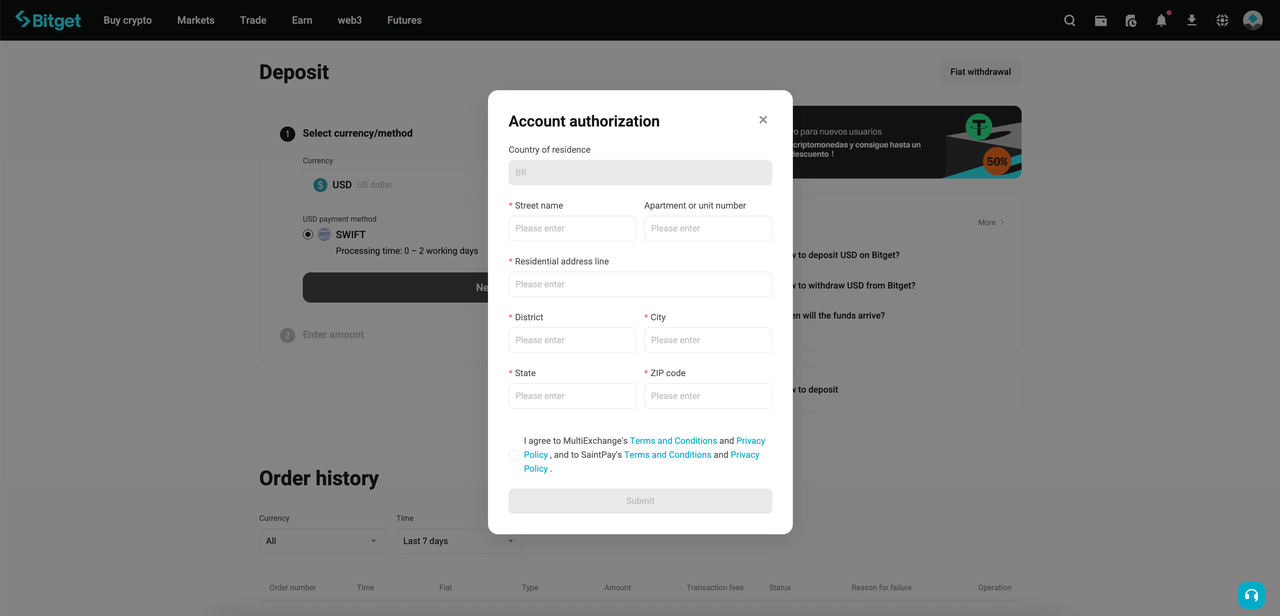
KYC users: Provide your residential address and agree to the User Terms
-
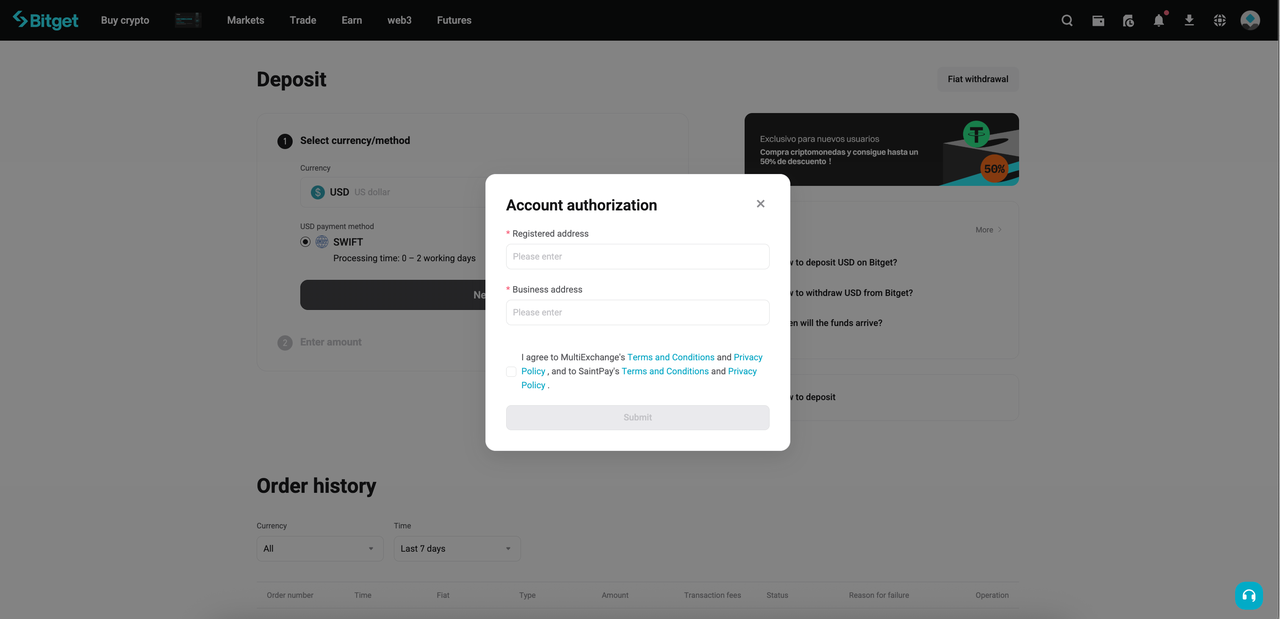
KYB users: Agree to the Institutional Account Terms. In some cases, KYB users may also need to provide their registered office address and business address in English, especially if the KYB verification documents initially submitted were in a non-English language.
-
After clicking Next, submit the required information to activate your fiat account.
-
The review will take at least 1 business day.
-
Once the review is approved, you will receive a notification confirming that your account has been activated.
Note: Your fiat profile will be generated immediately via API, but the virtual IBAN (DVA) will be generated within 24 hours.
How to Deposit HKD on Bitget website
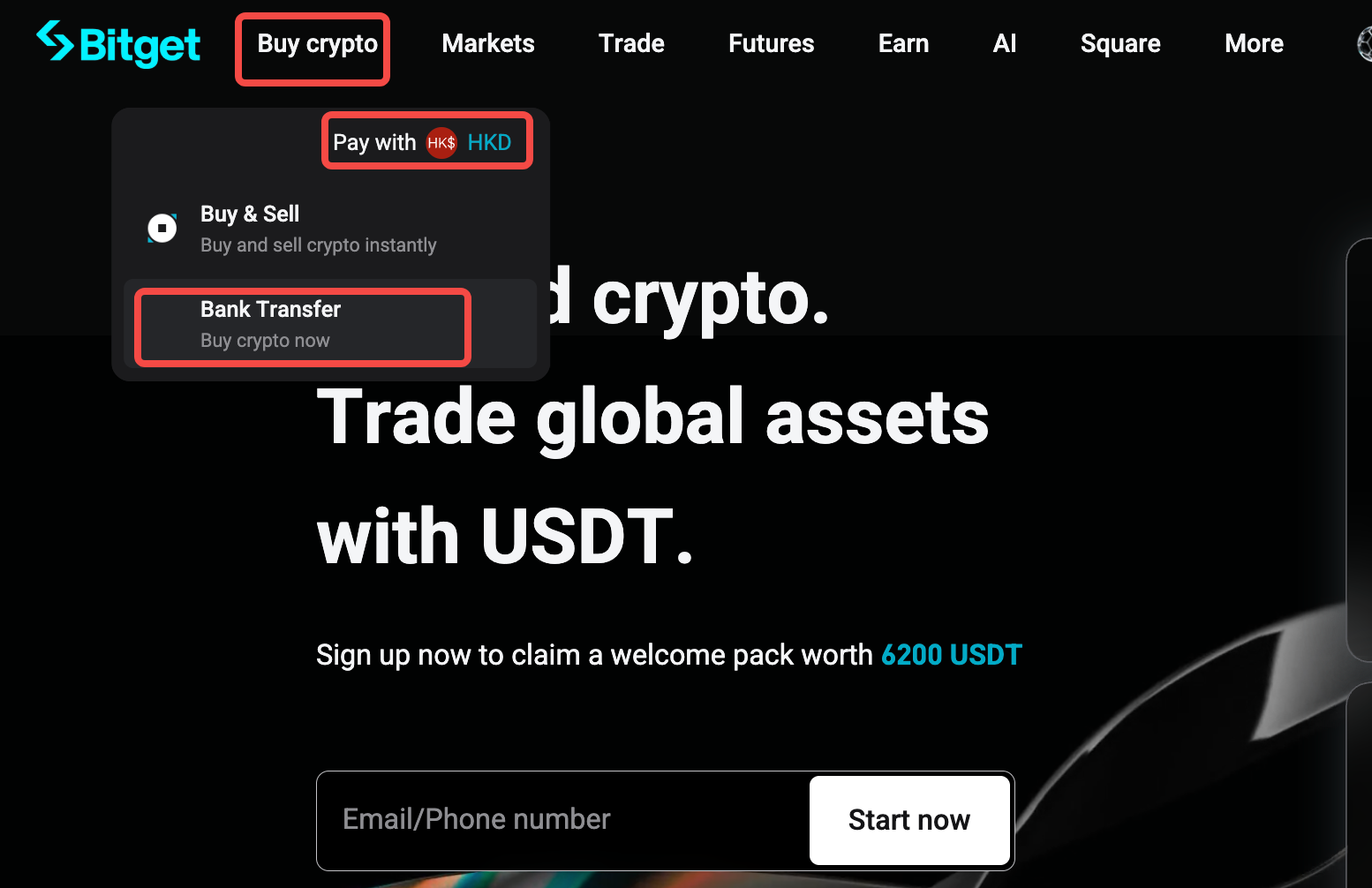
Step 1: Go to the HKD deposit page
1. Log in to your Bitget account.
2. Go to the fiat deposit page.
Step 2: Complete account authorization
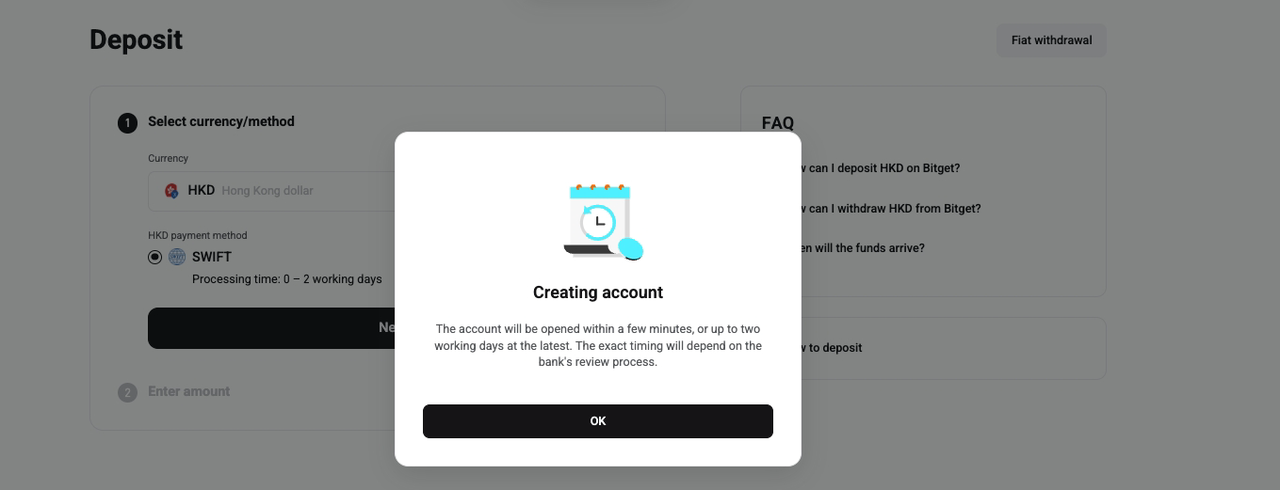
When using HKD fiat services for the first time, an Account authorization pop-up may appear.
1. Read the OSL Pay Terms and Conditions and Privacy Policy.
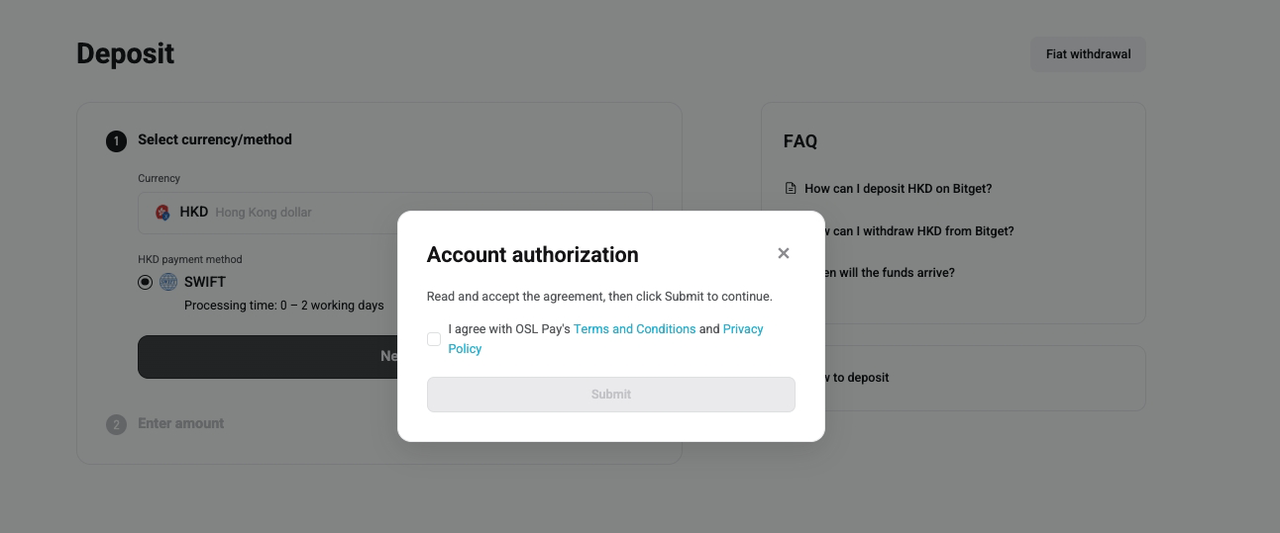
2. Tick the agreement checkbox.
3. Click Submit.
After submission, your account authorization will be processed. The account is usually opened within a few minutes, but it may take up to two working days, depending on the bank’s review process.
Step 3: Continue with the deposit
Once the account is created successfully:
1. Return to the HKD deposit page.
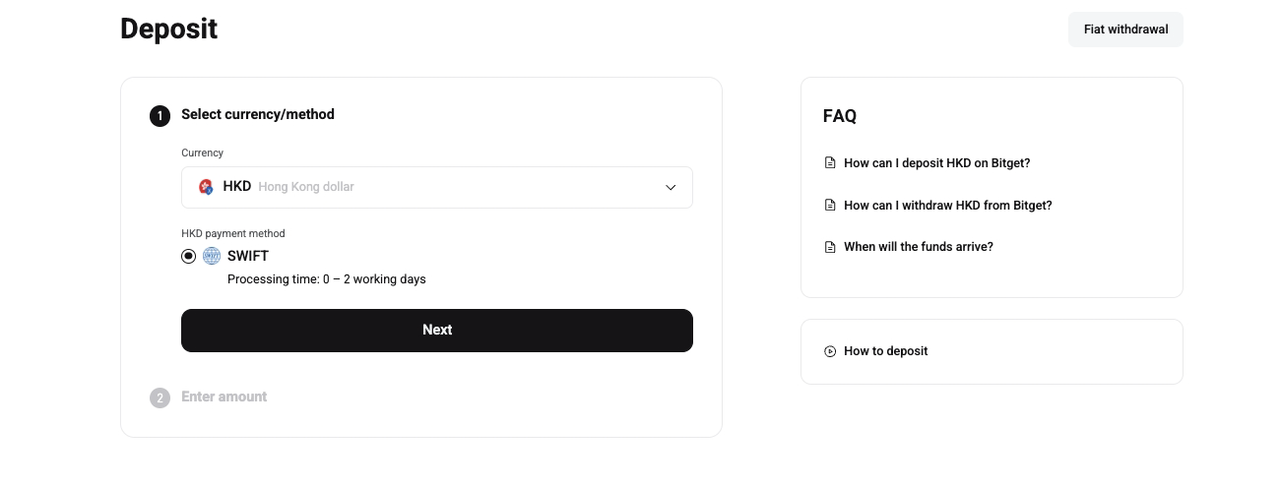
2. Confirm the selected currency and payment method.
3. Click Next.
4. Follow the on-screen instructions to complete your bank transfer.
Make sure the transfer is made from a bank account under your own name. Deposits from third-party accounts may be rejected or delayed.
How to Withdraw HKD on Bitget website?
Step 1: Go to the HKD withdrawal page
1. Log in to your Bitget account.
2. Go to the fiat withdrawal page.
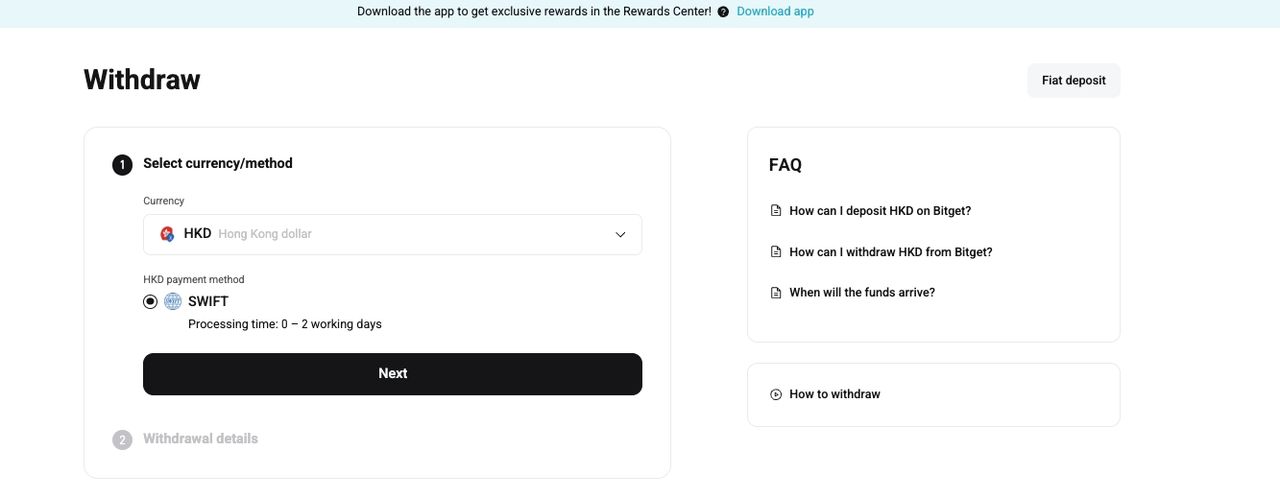
3. Select HKD as the currency.
4. Select SWIFT as the HKD payment method.
The estimated processing time is 0–2 working days.
Step 2: Enter withdrawal details
1. Enter the withdrawal amount.
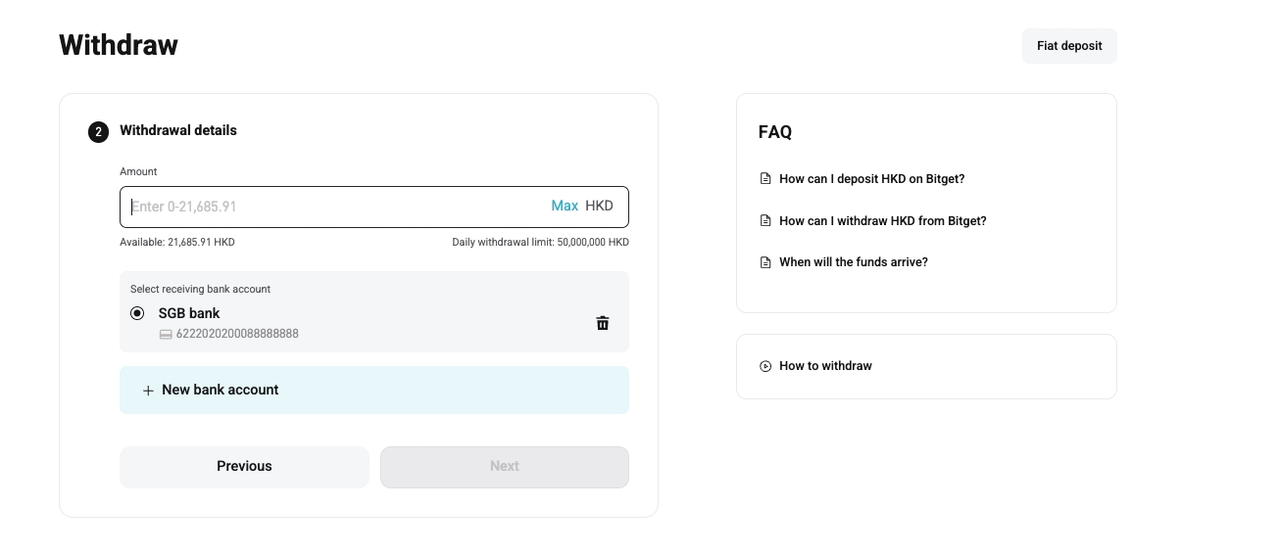
2. Select an existing receiving bank account, or click New bank account to add one.
3. Check your available balance and the daily withdrawal limit.
4. Click Next.
Step 3: Bind a new bank account
If you choose to add a new bank account, enter the required bank details:
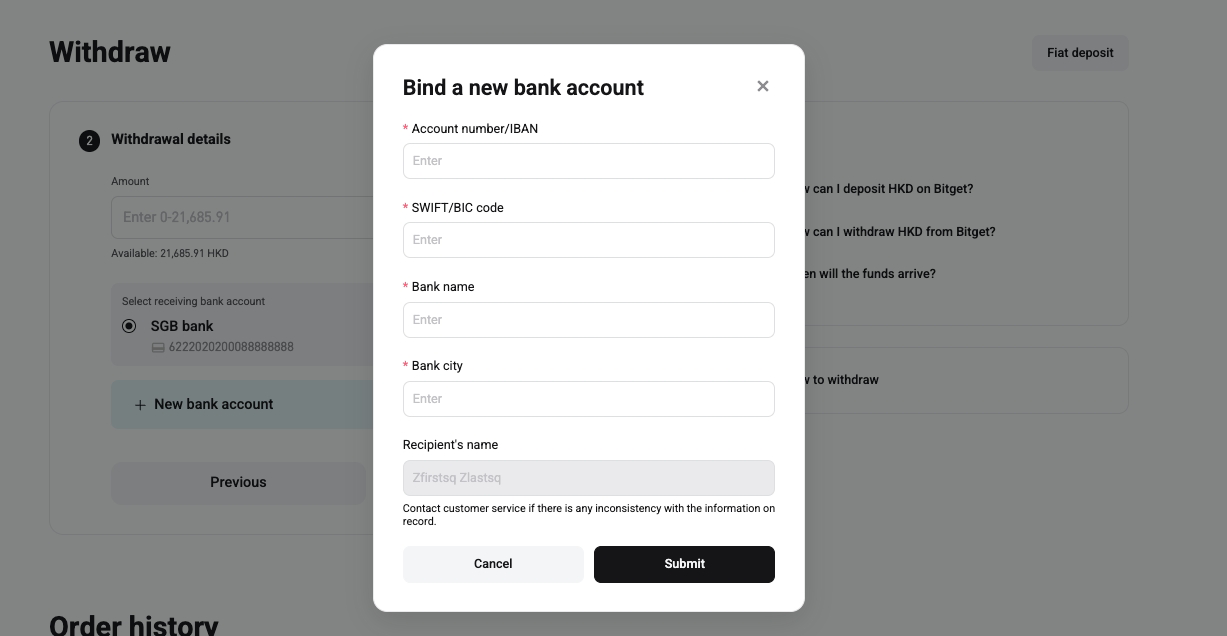
1. Account number/IBAN
2. SWIFT/BIC code
3. Bank name
4. Bank city
Your recipient name will be automatically displayed based on your verified account information. If the information is incorrect or inconsistent, contact customer service before submitting.
Click Submit after confirming all details are correct.
Step 4: Confirm withdrawal details
Before submitting the withdrawal request, carefully check the following information:
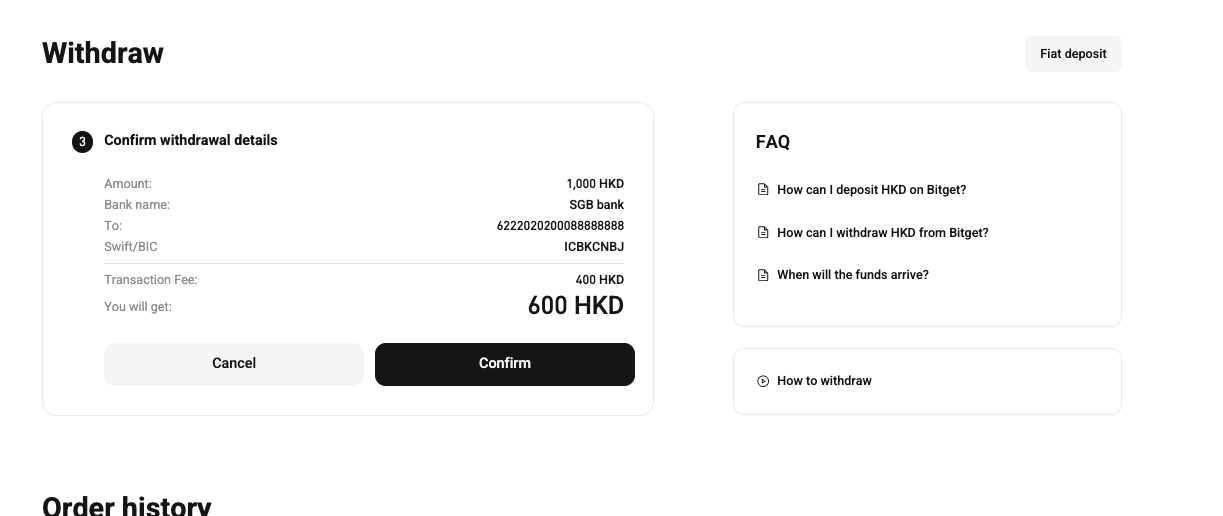
1. Withdrawal amount
2. Bank name
3. Receiving account number
4. SWIFT/BIC code
5. Transaction fee
6. Final amount you will receive
Click Confirm to submit the withdrawal request.
Step 5: Check withdrawal status
After the withdrawal request is submitted, the order status may show as Pending. You can check the order number, order time, withdrawal amount, and fee on the order details page.
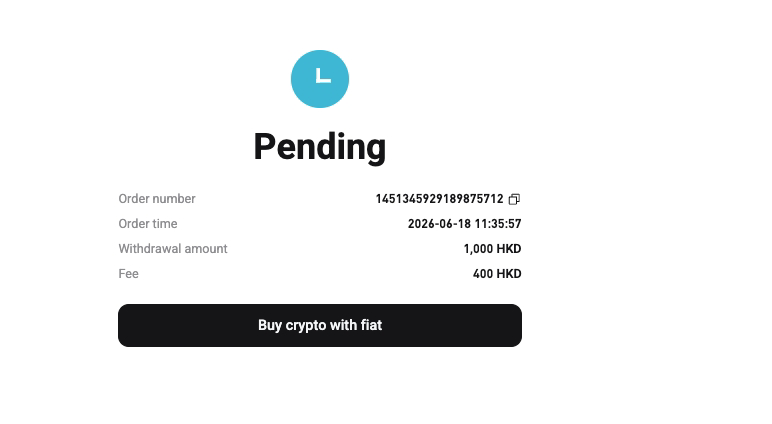
The funds will be processed according to the bank review and transfer schedule. Actual arrival time may vary depending on the bank and intermediary banks.
Important Notes
-
HKD deposits and withdrawals are processed via SWIFT.
-
The estimated processing time is 0–2 working days, but actual arrival time may vary.
-
Make sure your bank account information is accurate before submitting a withdrawal.
-
The bank account holder’s name should match your verified Bitget account name.
-
Fees may apply to HKD withdrawals. Check the displayed transaction fee before confirming your withdrawal.
-
If your deposit or withdrawal has not arrived after the expected processing time, contact customer service with your order details.
FAQs
1. Which HKD transfer method is supported on Bitget?
Bitget currently supports HKD deposits and withdrawals via SWIFT bank transfer. The estimated processing time is 0–2 working days, but the actual arrival time may vary depending on the bank and intermediary banks.
2. Do I need to complete account authorization before depositing HKD?
Yes. When using HKD fiat services for the first time, you may need to complete account authorization. Read and accept the OSL Pay Terms and Conditions and Privacy Policy, then submit the request. The account is usually opened within a few minutes, but it may take up to two working days depending on the bank’s review process.
3. Why do I need to provide additional information before using HKD SWIFT transfers?
Additional information may be required to activate your fiat account and meet compliance requirements. KYC users may need to provide their residential address and agree to the User Terms. KYB users may need to agree to the Institutional Account Terms and, in some cases, provide their registered office address and business address in English.
4. Can I deposit HKD from someone else’s bank account?
No. The bank account used for HKD deposits should be under your own name and match your verified Bitget account name. Deposits from third-party accounts may be rejected or delayed.
5. What should I do if my HKD deposit or withdrawal has not arrived?
If your HKD deposit or withdrawal has not arrived after the estimated processing time, please contact customer service and provide your order details, such as the order number, order time, transfer amount, and any relevant bank transfer proof.
Join Bitget, the world's largest Universal Exchange (UEX)


