
How to Withdraw VND on Bitget?
現在の記事は、選択した言語をサポートしていません。自動的に英語が推奨されています。
How to Withdraw VND on Bitget?
[Estimated Reading Time: 3 minutes]
This article will guide you through the process of withdrawing Vietnamese Dong (VND) from your Bitget account to your local bank account. Bitget offers convenient withdrawal options for VND, making it easy for you to transfer your funds.
How to Withdraw VND?
Step 1: Access the Withdrawal Page
1. Navigate to the Assets tab at the top of the page.
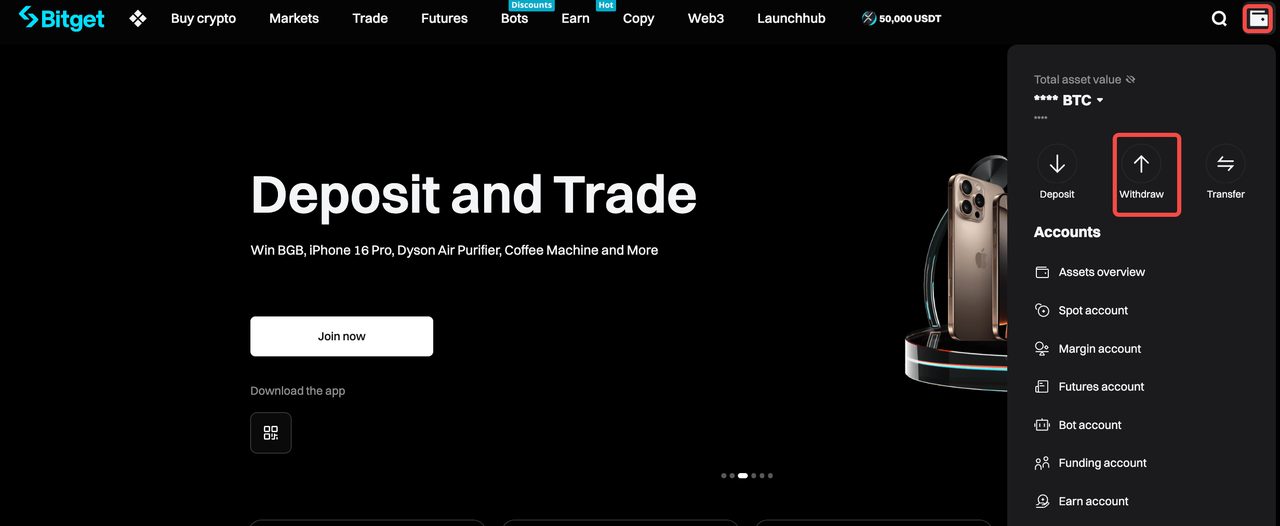
2. From the dropdown menu, select Withdraw.
Step 2: Choose Fiat Withdrawal
1. On the Withdraw page, click Withdraw fiat on the left-hand menu.
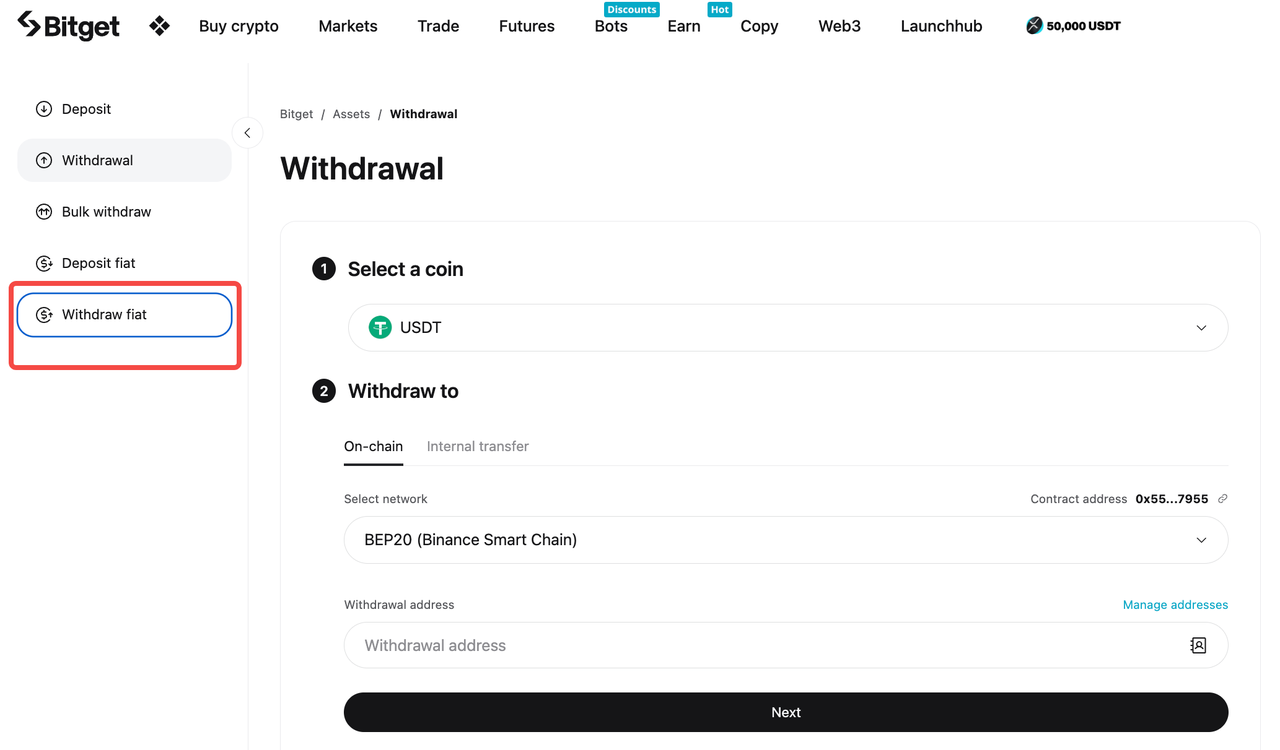
2. From the list of available fiat currencies, choose VND (Vietnamese Dong).
Step 3: Select Withdrawal Method
Bitget currently supports Bank Transfer as the only withdrawal method for VND.
1. Select Bank Transfer as your withdrawal method.
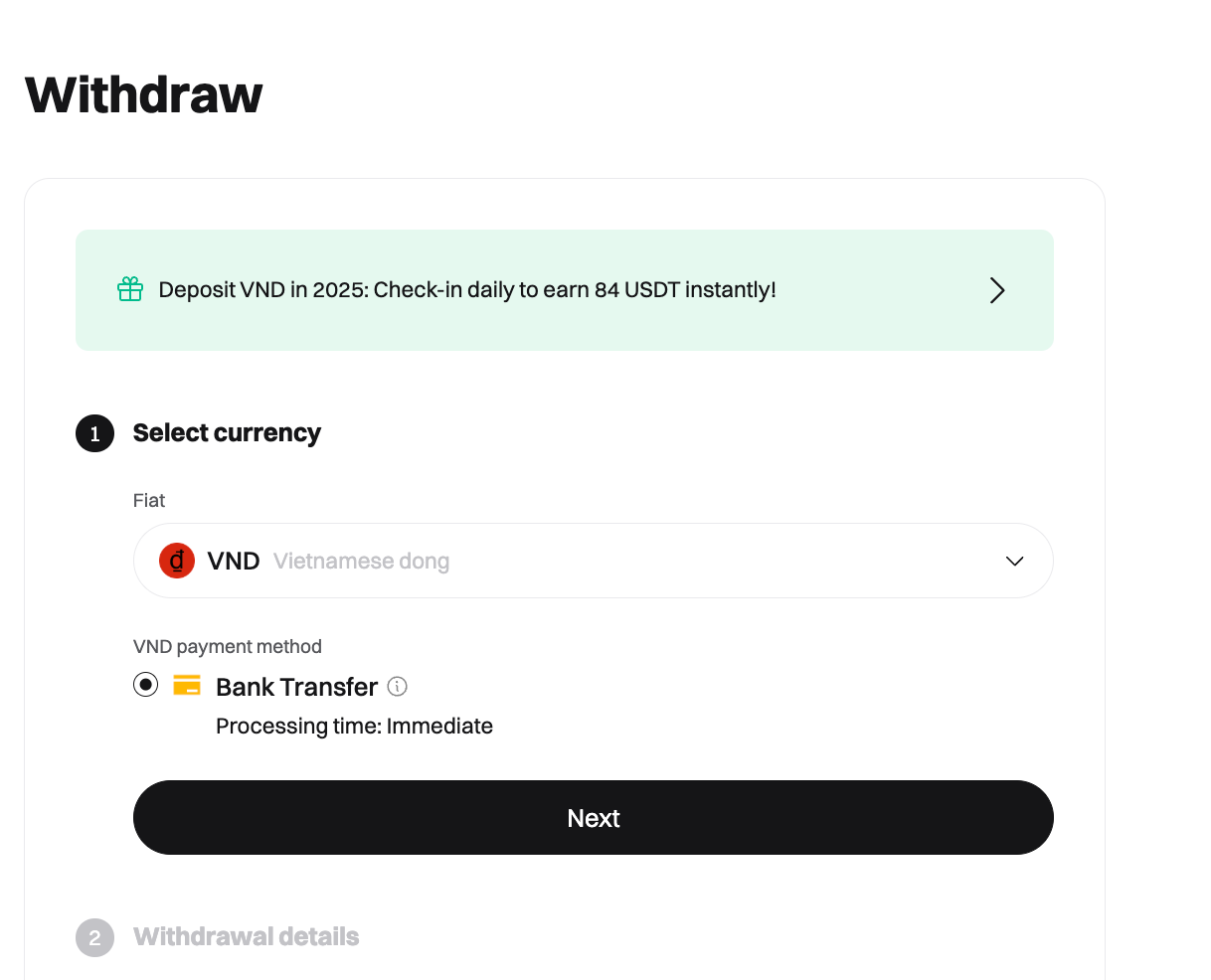
2. Enter your local bank account details.
Step 4: Enter Withdrawal Amount
1. Enter the amount of VND you wish to withdraw.
2. Confirm the details of your bank account and withdrawal amount.
3. Bitget will display any applicable fees for the transaction. Make sure to review them before proceeding.
Step 5: Verify Withdrawal Request
1. Before confirming the withdrawal, you may be asked to complete a Two-Factor Authentication (2FA) process to verify your identity.
2. Double-check that all the information is correct, including your bank details, withdrawal amount, and any associated fees.
Step 6: Confirm Withdrawal and Wait for the Funds to Arrive
1. Once you’re satisfied with the details, click Confirm to initiate the withdrawal process.
2. After confirming, the withdrawal request will be processed. You will receive a confirmation email, and your VND will be transferred to your bank account.
-
Processing Time: VND withdrawals generally take 1–2 business days, depending on your bank’s processing times.
Important Notes
-
Bank Account Name: Ensure that the name on your Bitget account matches the name on your bank account. Withdrawals to third-party accounts are not allowed.
-
Withdrawal Fees: There may be transaction fees associated with withdrawals. Please review the fee schedule on the withdrawal page.
-
Minimum and Maximum Withdrawal Limits: Make sure to check the minimum and maximum withdrawal limits before initiating your transaction. These limits may vary depending on the payment method.
-
Bank Processing Times: Some banks may take longer to process the transfer. Be patient, and allow extra time for the funds to appear in your account.
FAQs
1. How long does it take for my VND withdrawal to be processed?
VND withdrawals typically take 1–2 business days. However, the processing time may vary depending on your bank.
2. What should I do if my withdrawal hasn't arrived after 2 business days?
You should double-check that your bank account details were entered correctly. If the funds have not been received after the expected timeframe, contact Bitget’s support team with your transaction ID and relevant information.
3. Are there any withdrawal fees for VND?
Yes, there may be withdrawal fees, which vary depending on the payment method and the amount being withdrawn. Please review the fee details on the withdrawal page before confirming the transaction.
4. Can I withdraw VND to a third-party bank account?
No, withdrawals must be made to an account that matches the name on your Bitget account.
5. What are the minimum and maximum withdrawal limits for VND?
Minimum and maximum withdrawal limits vary depending on the payment method you select. Check the details on the Withdrawal page.
Join Bitget, the World's Leading Crypto Exchange and Web3 Company
*本公告は時間的制約のある内容です。公開日をご確認ください。状況の変化や内容の陳腐化により生じたいかなる直接的または間接的な損失についても、当プラットフォームは一切の責任を負いません。