
Bieżący artykuł nie obsługuje wybranego języka, został on automatycznie zarekomendowany dla Ciebie w języku angielskim
CFD elite portfolios: Private type guide
[Estimated reading time: 5 minutes]
Private copy trading is an invite-only way to let others copy your trades. As a CFD elite trader, you can create a private elite portfolio so that only people who have your access code or referral link can copy your trades. This lets you open copy trading to specific channels or groups, rather than to the public.
Key benefits
• Only users you invite can copy your trades, keeping your trading strategy private.
• Share different referral links across different channels to track each channel's conversion.
• Runs independently of your public elite portfolio, so you can operate one public and one private portfolio at the same time.
Getting started
Step 1: Create a private elite portfolio
1. Go to the CFD elite portfolio creation page and select the Private type (alongside the Public type).
2. Fill in details such as the profit share ratio (0%–50%, integers only) and the elite trading amount, following the same steps as for a public portfolio.
3. Tap Create. Once done, a new CFD (Private) tab will appear in your elite trader center.
Note: By default, a private elite portfolio supports up to 100 copiers, independent of the copier limit for your public portfolio.
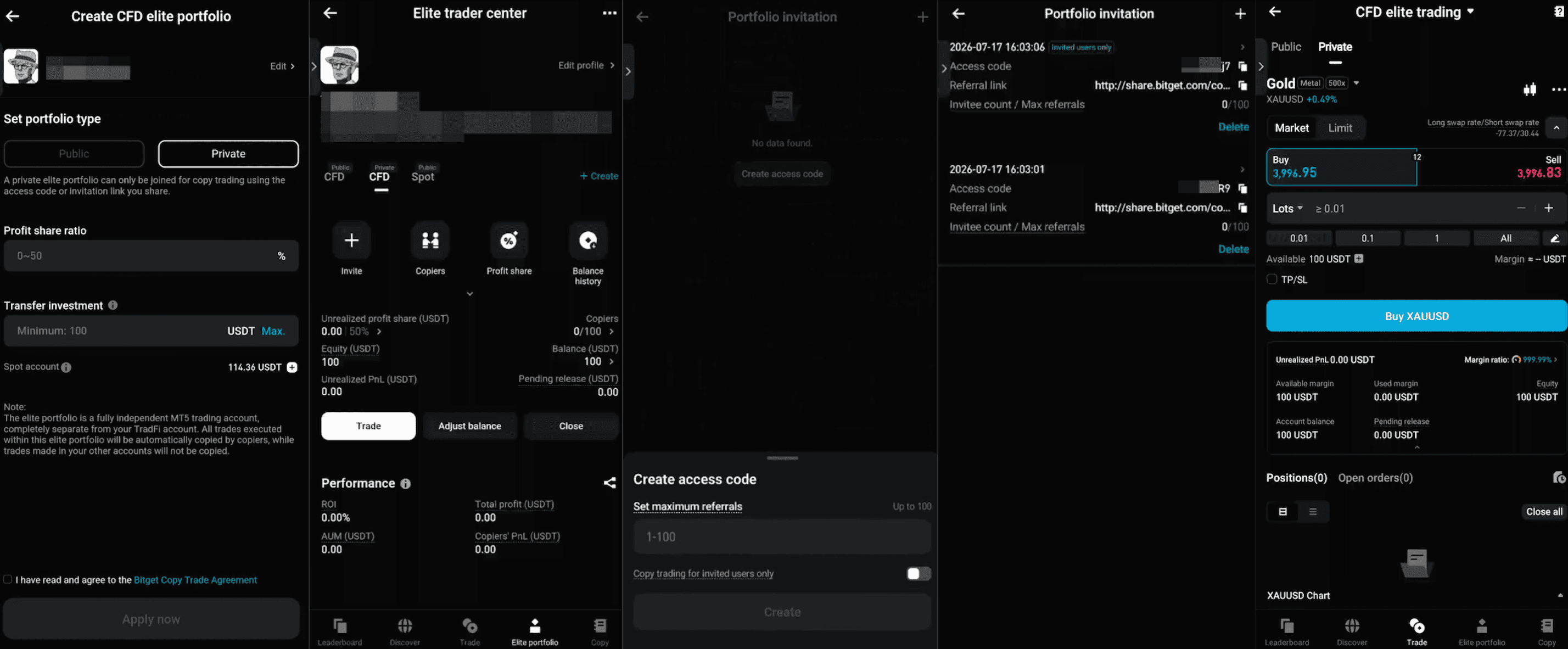
Step 2: Create a referral link to invite copiers
1. On the CFD (Private) tab, tap Create Invites.
2. Set the maximum number of invitees for this link (1–100).
3. Decide whether to turn on Copy Trading For Invited Users Only: When enabled, only new users who sign up through your referral link can use it to copy your trades. When disabled, anyone who visits your profile while the link is valid can copy your trades. This setting cannot be changed after the link is created, so confirm it before you proceed.
4. Tap Create to generate a unique access code and referral link, then copy and share them with the people you want to invite.
5. Each private elite portfolio supports up to 10 referral links.
Step 3: How copiers join
1. Open the elite trader's profile directly via their private referral link and start copying, or turn to the second method.
2. Manually enter the access code (supports numbers and letters, up to 8 characters) on the elite trader's profile. Once verified, you'll be taken to the copy trading settings page.
Once you're set up, the elite trader's private elite portfolio will appear in your copy trading center with a "Private" tag.
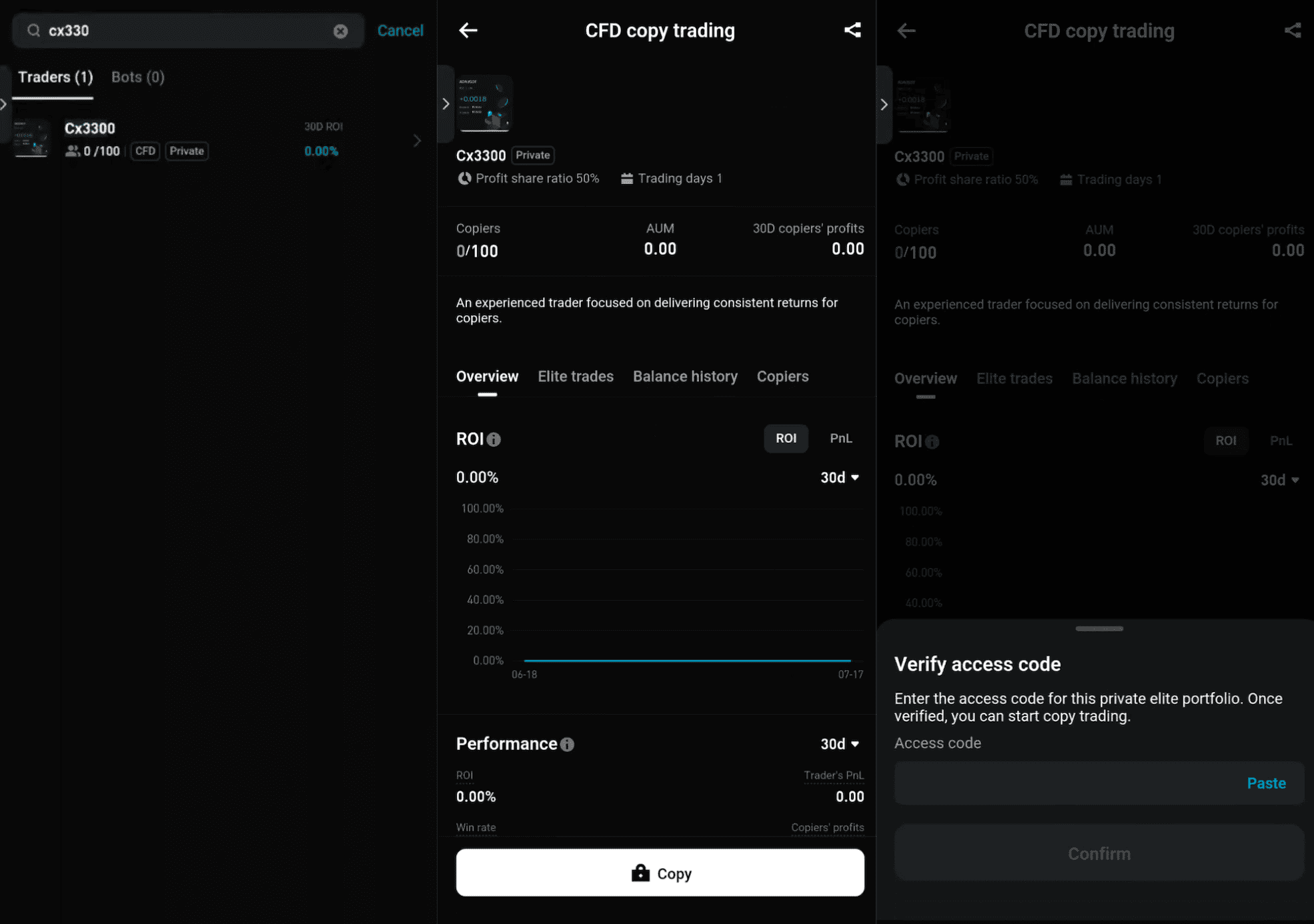
Step 4: How to remove a copier
1. In the elite trader center, go to the CFD (Private) tab and open the copier list to find the copier you want to remove.
2. Tap into that copier's details and tap Remove.
3. Removing a private copier isn't subject to any asset value limit. You can remove them regardless of their account equity.
FAQ
1. Can a private portfolio and a public portfolio exist at the same time?
Yes. Each elite trader can have up to one public and one private elite portfolio in the CFD line. Their data is tracked independently and does not affect each other.
2. If a copier stops copying, does that free up an invitation slot?
No. Once someone has copied via a referral link, it uses up a slot. Slots aren't released if the copier later stops copying. They will need a new slot or another link to join again.
3. If I delete a referral link, will copiers who already joined be removed?
No. Deleting a referral link only affects people who try to use it afterward. Copiers who already joined successfully aren't affected.
4. Why do I see "A private elite portfolio already exists" when I try to create one?
Each elite trader can only have one private elite portfolio in the CFD line. You'll need to close your existing private portfolio before creating a new one.
5. Can I copy a private portfolio on an older app version?
Not directly. You can open the elite trader's profile normally on an older app version, but tapping Copy will prompt you to update to the latest version.
6. What is "affiliate copy"?
Affiliate copy mode is an additional gating feature for affiliate channels. It must be enabled by the platform operation team for specific elite traders, so regular elite traders won't see this feature by default. Once enabled, elite traders must set an affiliate code when creating a referral link. Only users whose account affiliate information matches that code can copy via the link. Other users will be unable to copy, even if they have the link.
7. As an elite trader, can I remove copiers from my private portfolio myself?
Unlike a public elite portfolio, a private elite portfolio does allow you to remove copiers. Just find the copier in the copier list in your elite trader center and tap Remove.
Join Bitget, the world's largest Universal Exchange (UEX)
Udostępnij


