
Jak handlować na Bitget Stock+?
[Szacowany czas czytania: 5 minut]
Dlaczego warto handlować na platformie Bitget Stock+
1. Pełen zakres usług brokerskich:
Przyjazny dla użytkownika interfejs: zaprojektowany tak, by nawiązywać do wyglądu i stylu popularnych platform brokerskich — przejście na tę platformę nie wymaga żadnego okresu nauki.
• Obsługa przenoszenia akcji: Przenieś swoje akcje od innych brokerów do Bitget i skorzystaj z bonusów za przeniesienie w okresie trwania promocji.
• Handel 24/5: Handluj akcjami amerykańskimi przed otwarciem rynku, w godzinach sesji, po zamknięciu rynku oraz w sesjach nocnych.
• Bezpłatne dane rynkowe w czasie rzeczywistym: Uzyskaj bezpłatny dostęp do notowań poziomu 1 w czasie rzeczywistym już w momencie otwarcia konta. Kwalifikujący się użytkownicy VIP mają bezpłatny dostęp do Nasdaq TotalView poziomu 2 oraz innych danych rynkowych z dokładnością do milisekund — co pozwala zaoszczędzić nawet 248 dolarów rocznie.
• Akcje ułamkowe bez minimalnej kwoty inwestycji: Zacznij inwestować już od 0,0001 akcji – nie ma wymogu minimalnej kwoty inwestycji. Z łatwością zdywersyfikuj swój portfel.
• Informacje rynkowe: Bądź na bieżąco z najnowszymi wiadomościami, raportami finansowymi i analizami dotyczącymi popularnych akcji, które pomogą Ci w podejmowaniu decyzji inwestycyjnych.
2. Łatwe wpłaty i wypłaty: Platforma obsługuje zarówno wpłaty i wypłaty w walutach fiducjarnych, jak i kryptowalutach — wszystko to w ramach jednej aplikacji. Wypłata następuje natychmiast po rozliczeniu T+1, bez konieczności oczekiwania.
3. Niskie opłaty: Już od 0,1%, a w okresie promocyjnym opłaty są obniżone nawet o 50%.
4. Nagrody dla nowych użytkowników: Wykonaj zadania, takie jak otwarcie konta, dokonanie wpłaty i złożenie zlecenia, aby uzyskać dostęp do puli atrakcyjnych nagród.
Jak handlować na Bitget Stock+
W niniejszym przewodniku opisano krok po kroku cały proces — od otwarcia konta po kupno i sprzedaż. To proste: wystarczy postępować zgodnie z instrukcjami, aby zacząć inwestować w prawdziwe akcje amerykańskie.
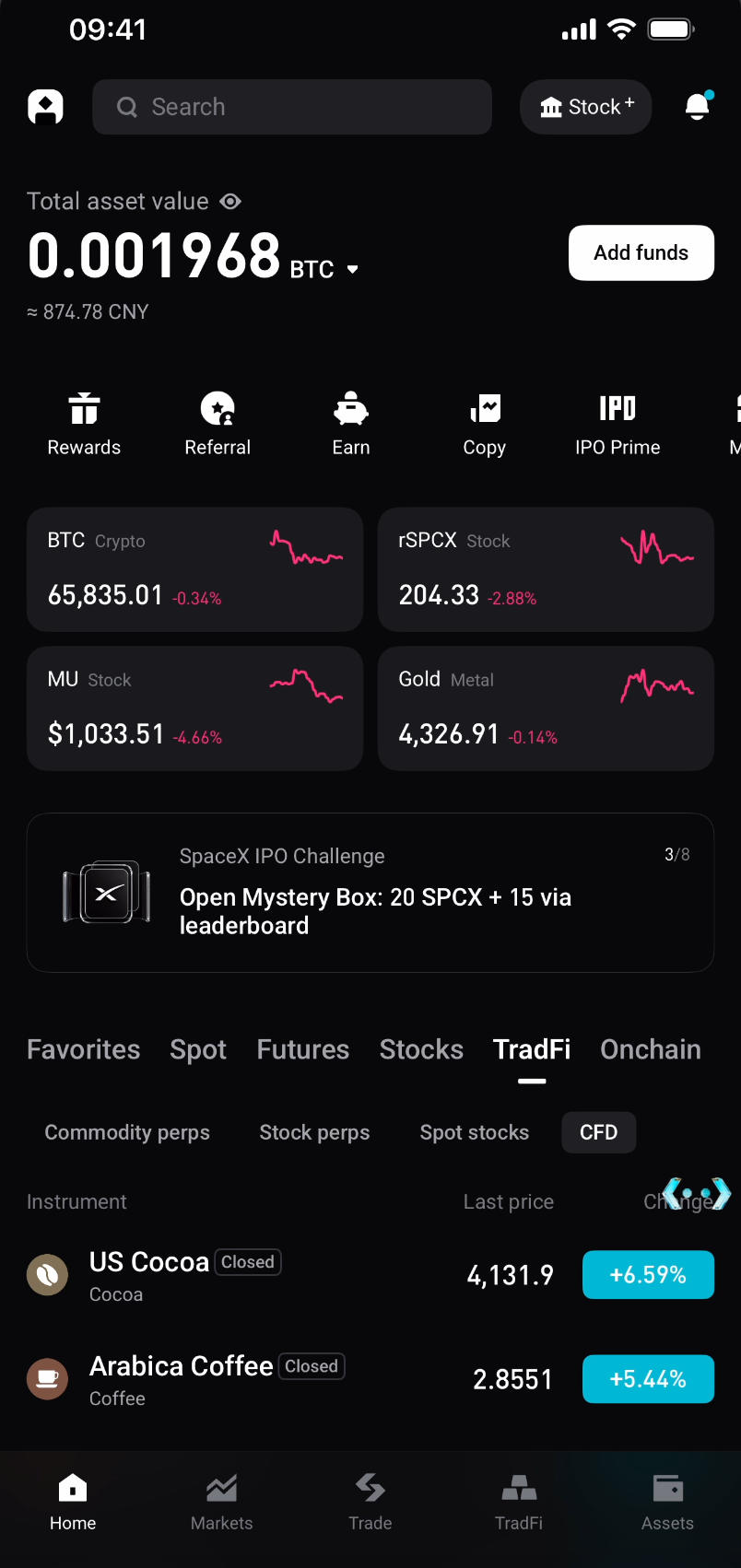
Krok 1: Wejdź na Bitget Stock+
1. Otwórz aplikację Bitget i dotknij ikony Stock+ w prawym górnym rogu strony głównej, aby przejść do sekcji handlu akcjami amerykańskimi.
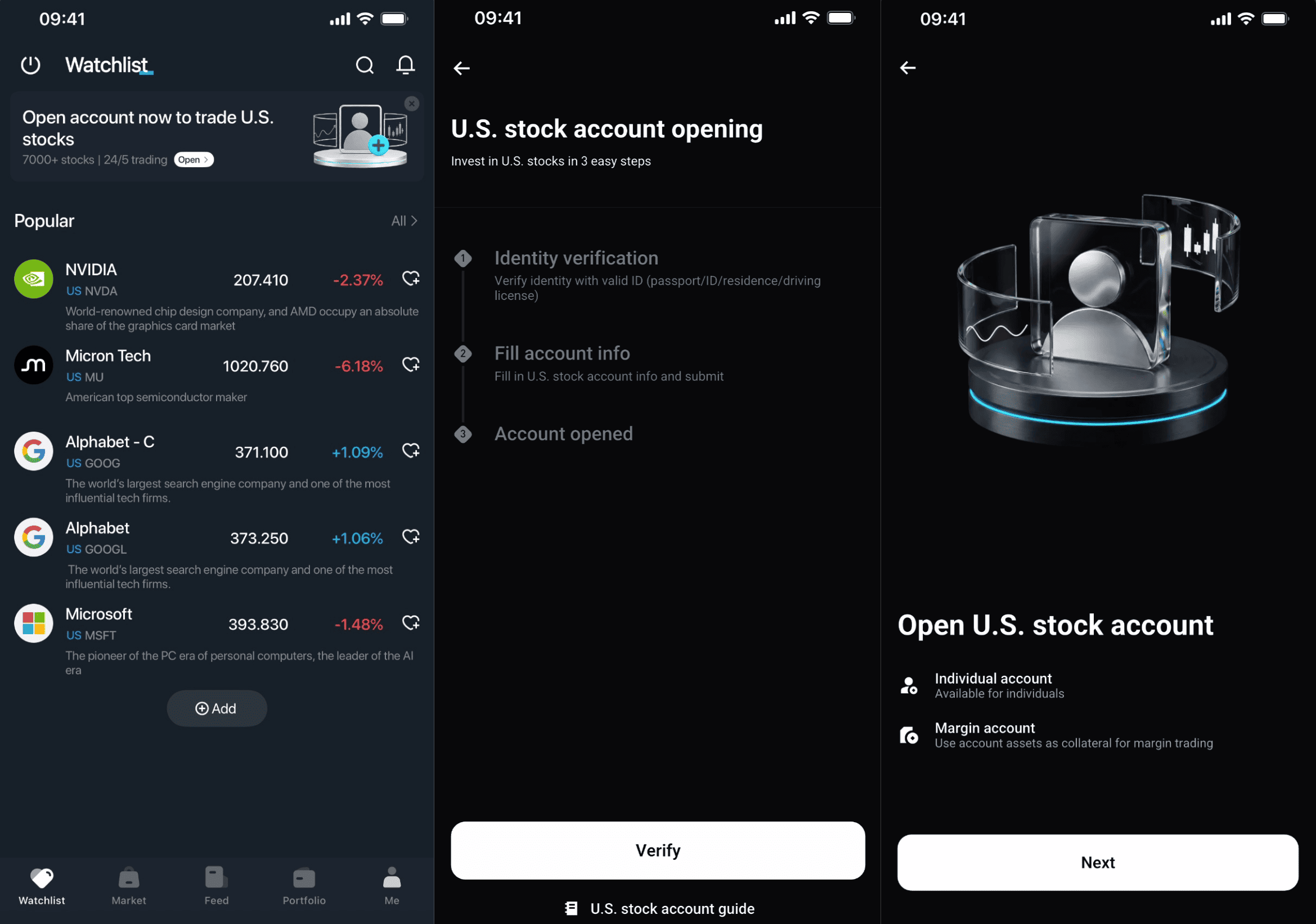
Krok 2: Otwórz konto akcji amerykańskich (tylko dla nowych użytkowników)
1. Wybierz Otwórz teraz.
2. Ukończ weryfikację tożsamości, jeśli jeszcze nie udało Ci się tego zrobić.
3. Podaj dane swojego konta.
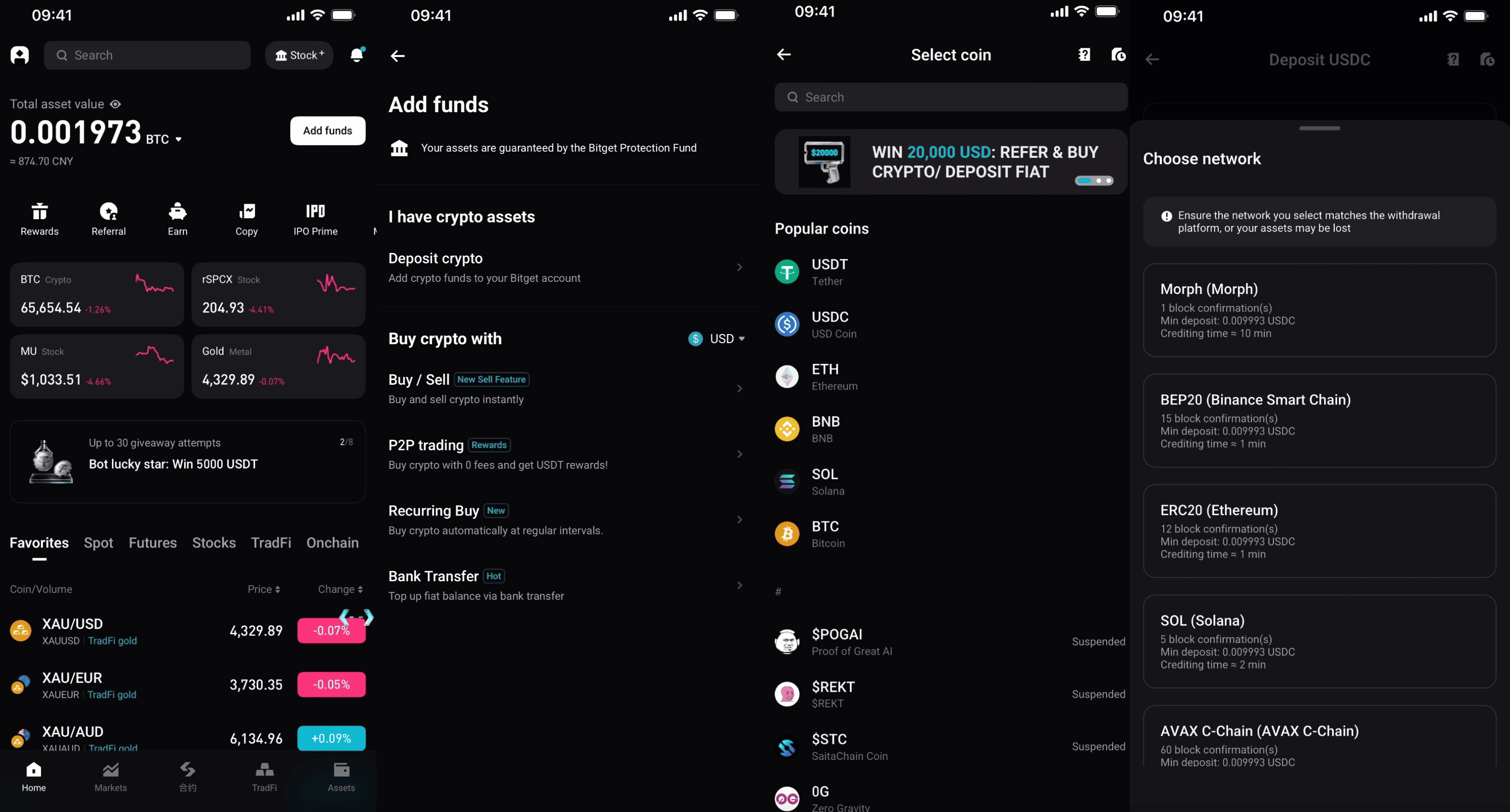
Krok 3: Wpłać środki
1. Przejdź na stronę główną i wybierz opcję Wpłata.
2. Wybierz wpłatę krypto.
3. Wybierz USDC.
4. Wybierz sieć i dokonaj wpłaty.
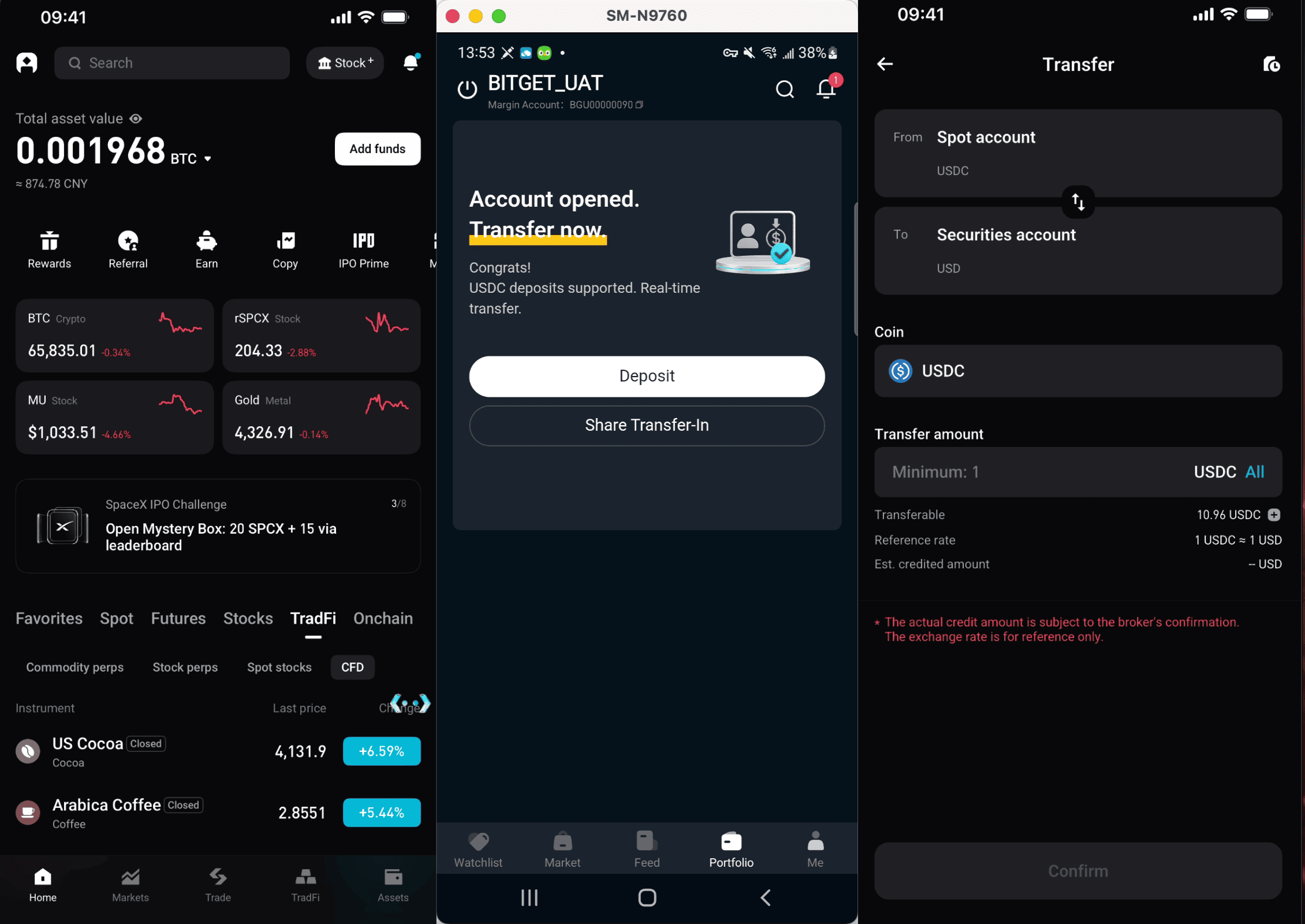
Krok 4: Przelej środki (USDC na swoje konto papierów wartościowych)
Zalecana metoda (przelew bezpośredni):
1. Przejdź do sekcji Aktywa.
2. Wybierz opcję Przelew.
3. Wybierz USDC i podaj kwotę.
4. Potwierdź przelew.
Krok 5: Kupuj i sprzedawaj akcje amerykańskie
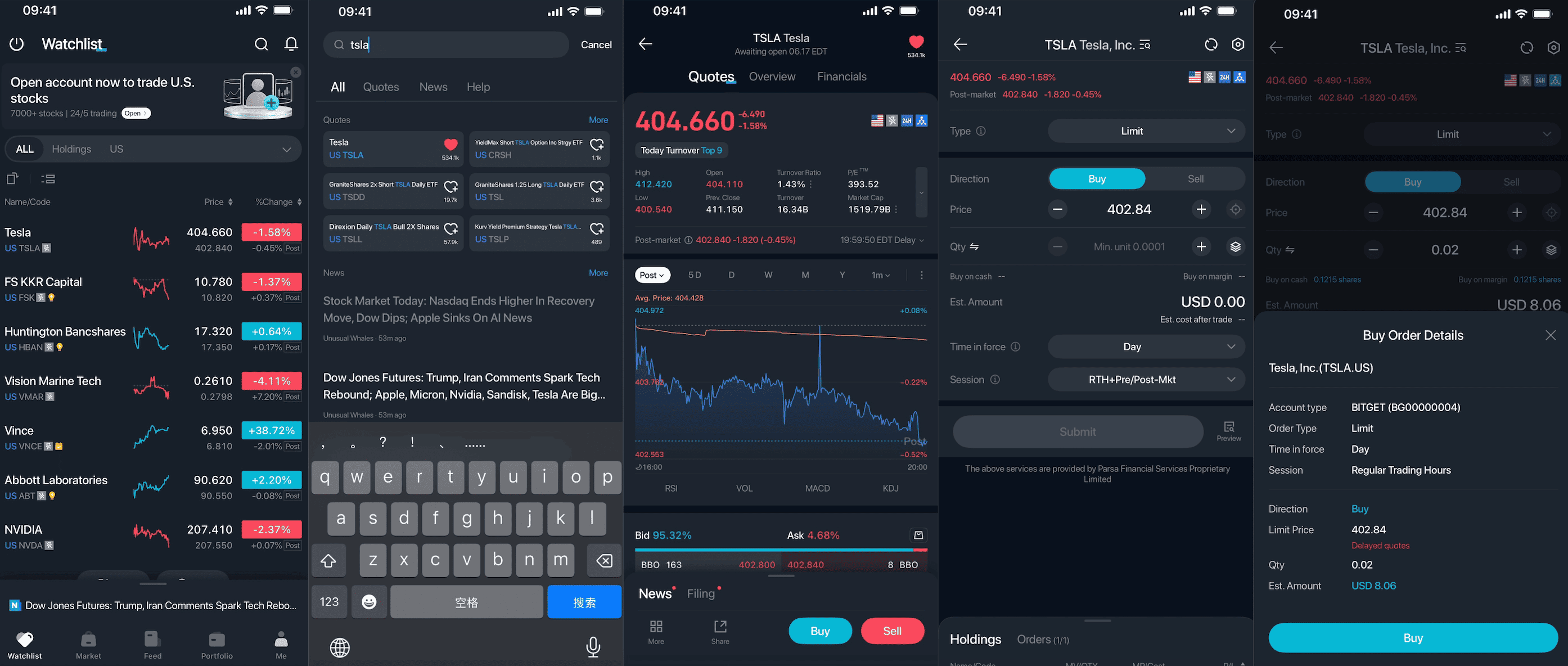
1. Wyszukaj symbol giełdowy (np. AAPL, NVDA lub TSLA) lub przejrzyj listę akcji.
2. Otwórz stronę ze szczegółowymi informacjami o akcjach.
3. Wybierz Kup lub Sprzedaj.
4. Wprowadź ilość i cenę, a następnie potwierdź zlecenie.
Krok 6: Przeglądaj swoje aktywa i zarządzaj nimi
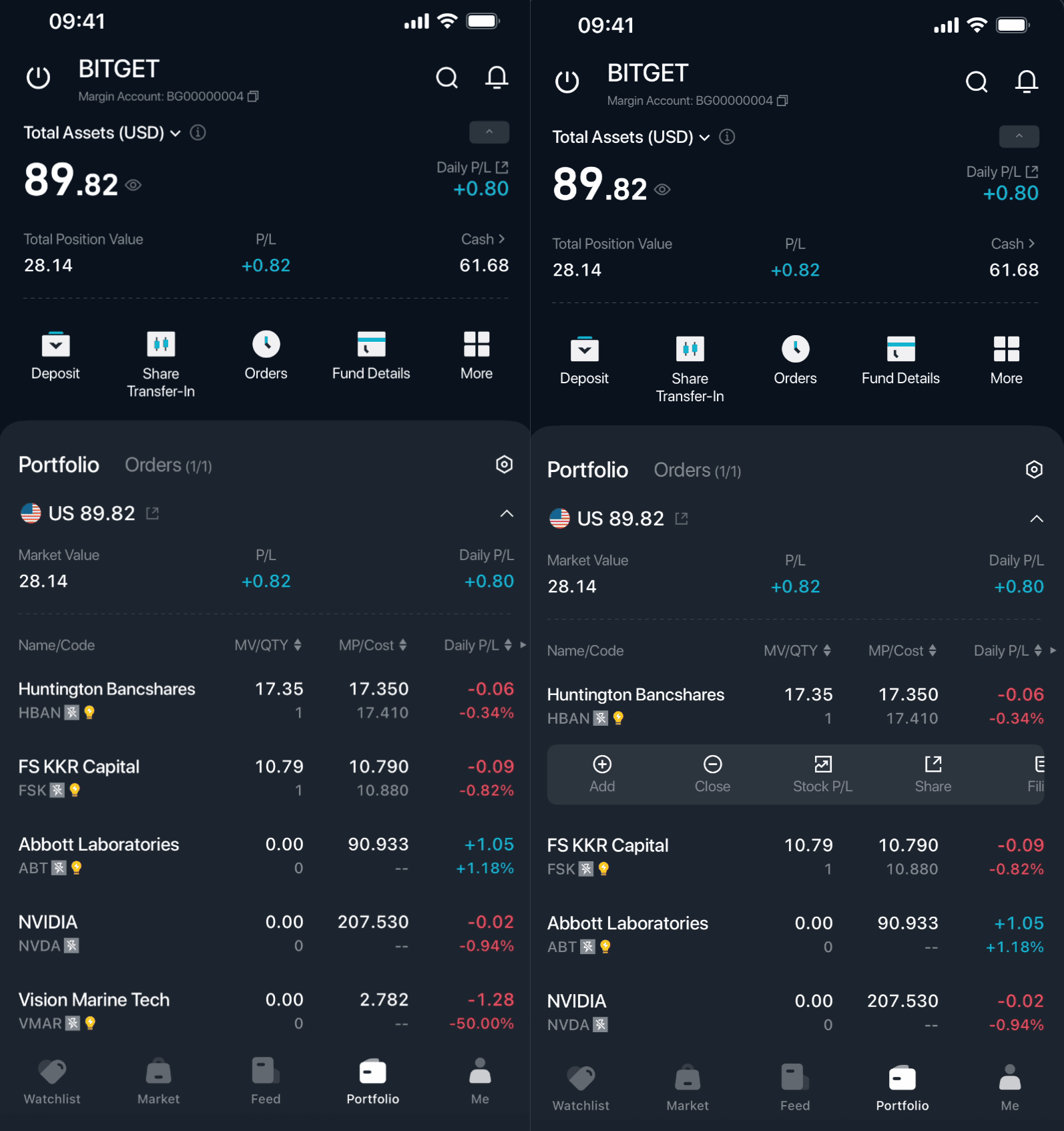
1. Przejdź do sekcji Aktywa.
2. Wyświetl swoje pozycje i historię zleceń.
3. W dowolnym momencie możesz zwiększyć, zmniejszyć lub zamknąć swoje pozycje.
Otwórz aplikację Bitget, kliknij Stock+ w prawym górnym rogu, załóż konto i zasil je środkami, a następnie rozpocznij swoją przygodę z inwestowaniem w akcje amerykańskie.
Często zadawane pytania
1. Czym jest Bitget Stock+?
Bitget Stock+ to usługa handlu akcjami amerykańskimi oferowana przez Bitget. We współpracy z brokerami posiadającymi licencje w Stanach Zjednoczonych – RQD Clearing i Atomic Vaults Securities – zlecenia są kierowane do Nasdaq, NYSE oraz regulowanych animatorów rynku w celu realizacji, co zapewnia dostęp do wysokiej płynności rynkowej. W aplikacji Bitget użytkownicy mogą kupować, sprzedawać i posiadać prawdziwe akcje spółek amerykańskich, korzystając przy tym z pełnych praw akcjonariusza, w tym dywidend pieniężnych, dywidend w formie akcji oraz praw głosu.
2. Jaka jest różnica między Bitget Stock+ a rTokenami (tokenami akcji)?
Główna różnica polega na aktywach bazowych i prawach własności:
Bitget Stock+: Odpowiada rzeczywistym akcjom przechowywanym przez regulowanego brokera. Użytkownicy są właścicielami autentycznych akcji spółek amerykańskich i korzystają z pełnych praw akcjonariuszy (dywidendy pieniężne/akcyjne, prawa głosu itp.).
rToken: token on-chain, który odzwierciedla kurs akcji amerykańskiej spółki i stanowi tokenizowany udział w zyskach, zabezpieczony w stosunku 1:1 akcjami przechowywanymi przez licencjonowanego brokera. Własność ma formę tokena on-chain, a nie bezpośredniego udziału w kapitale poprzez tradycyjne konto maklerskie.
3. Czy muszę otworzyć osobne konto, aby korzystać z Bitget Stock+? Jakie są wymagania?
Tak. Aby uzyskać dostęp do Bitget Stock+, konieczne będzie otwarcie subkonta papierów wartościowych. System wykorzysta jednak dane z zaawansowanej weryfikacji tożsamości, które zostały już przez Ciebie podane na platformie Bitget, więc nie musisz ponownie przesyłać żadnych dokumentów.
Wszyscy użytkownicy spoza krajów/regionów objętych ograniczeniami mogą założyć konto.
4. Czy mogę bezpośrednio handlować akcjami amerykańskimi, korzystając z wielu walut?
Obsługiwana jest dwukierunkowa konwersja USDC i USD w przypadku wpłat i wypłat. Inne kryptowaluty ani waluty fiducjarne nie są obsługiwane. Konto Bitget Stock+ wykorzystuje USD jako walutę rozliczeniową i wyceny, a wszystkie transakcje dotyczące akcji amerykańskich są przeprowadzane w USD.
5. Czy obsługiwane są wpłaty w walucie fiducjarnej? Czy istnieje minimalny wymóg wpłaty?
Tak. Użytkownicy mogą konwertować waluty fiducjarne na USDC za pośrednictwem funkcji szybkiego zakupu Bitget, handlu P2P oraz innych kanałów wpłat walut fiducjarnych, a następnie przelać środki na swoje konto Bitget Stock+. Nie ma wymogu dotyczącego minimalnej kwoty wpłaty.
6. Jakie są opłaty transakcyjne? Czy istnieje minimalna kwota transakcji?
Standardowa opłata transakcyjna zaczyna się od 0,1%. Do 31 sierpnia 2026 r. obowiązuje zniżka promocyjna 50% (aktualne informacje można znaleźć na stronie produktu).
Minimalna kwota transakcji podlega oficjalnym zasadom obowiązującym w momencie wprowadzenia produktu. Zazwyczaj ustala się rozsądny próg, aby zapewnić klientom komfortowe warunki handlowe.
7. Czy obowiązują limity pozycji lub ograniczenia dotyczące handlu dziennego?
Nie ma żadnych ograniczeń. Możesz swobodnie prowadzić handel jednodniowy bez żadnych ograniczeń.
Dołącz do Bitget, największej na świecie giełdy uniwersalnej (UEX)
Zarejestruj się teraz w Bitget >>>


